
If you want to move your main shared hosting account to become an addon under another hosting account, this step-by-step guide will help you do it safely, including your website files, emails, and databases.
Step 1: Backup Your Website
- Log in to your old hosting account.
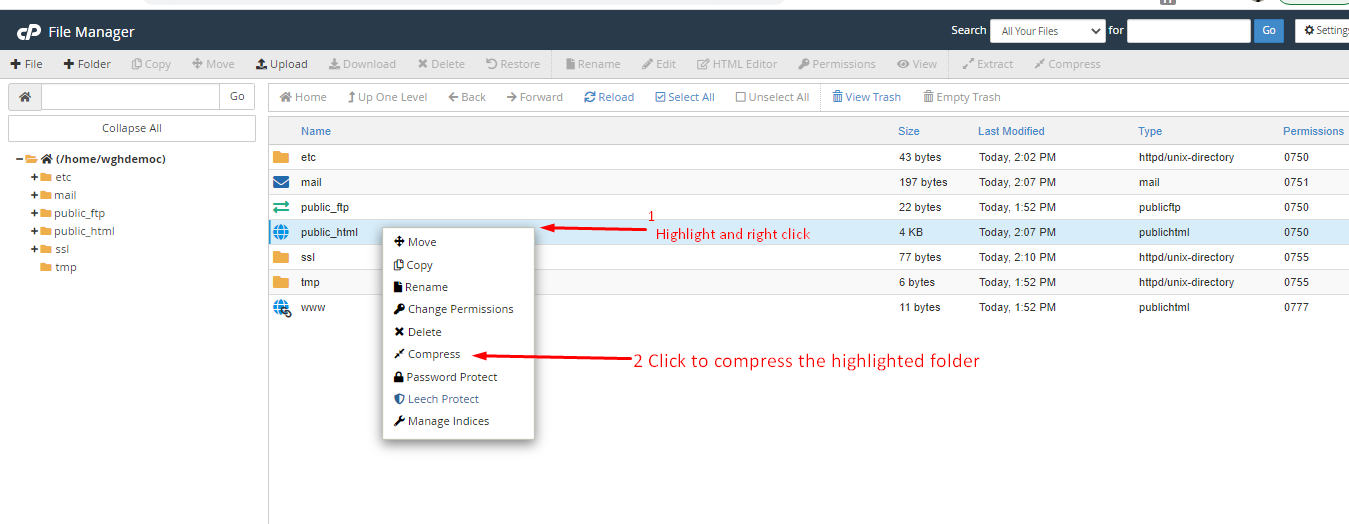
3. Download the compressed ZIP file to your computer.
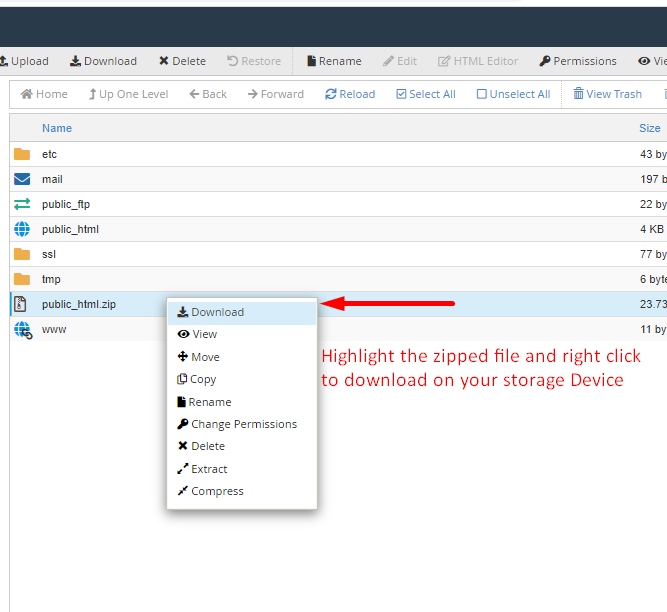
This ensures your website files are safely stored before moving.
Step 2: Backup Email Accounts
If your main account has email accounts:
1. In File Manager, open the mail folder. Compress the folder for your main domain and download it.
2. Open the etc folder, compress the main domain folder, and download it.

These backups preserve all your emails and configurations.
Step 3: Backup Databases
- Log in to phpMyAdmin in your old account.
- Select each database, click Export, and save the SQL files to your computer.
- Make sure your primary domain no longer points to the old hosting account before moving forward.
Restoring Your Main Account as an Addon
Step 4: Upload Website and Email Files
- Log in to your new hosting account.
- Add the domain as an Addon Domain in cPanel.
- Open File Manager → public_html, upload the website backup ZIP, and extract it into the addon domain folder.
- Repeat the process for the mail and etc folders.
Set folder permissions properly:
- public_html: 0750
- mail: 0751
- etc: 0750
Check Email Accounts in cPanel to ensure all emails are visible. If any are missing, contact support for help.
Step 5: Restore Databases
- Create a new database, user, and password for the addon domain.
- Update your website configuration files with these new credentials.
- In phpMyAdmin, select the new database, click Import, and upload the SQL files from your PC.
- Verify that all tables are present and everything is functioning correctly.
Once these steps are complete, your old hosting account is now fully migrated as an addon domain under your new hosting account, including all website files, emails, and databases.